DiwaSpin App – Rummy Gaming | Bonus, Download & Features 2026
Latest
66.28MB
1.0.1
DiwaSpin Official App
11.5M

Description
हेलो दोस्तों आज इस आर्टिकल में आपको DiwaSpin App के बारे में बताने जा रहा हूँ। आप अपने घर पर रह कर अपने Android Phone से रोज के लाखों रुपया कमा सकते हैं। सबसे पहले आपको ऊपर दिए गए लिंक से DiwaSpin Application को डाउनलोड कर लेना है। DiwaSpin एप्लीकेशन के अंदर अपना फोन नंबर और बैंक खाता जोड़ना है।

How To Download in DiwaSpin App?
Downloading the DiwaSpin app is something many users want to learn, especially those who are new to the platform. If you are trying to download DiwaSpin on your Android phone, you should first understand where to find the app, how to check whether the download source is genuine, and how to install it safely.
This guide explains the general process of downloading and installing the DiwaSpin app in simple English.
1. What Is the DiwaSpin App?
DiwaSpin is the name of an online platform that users may search for when looking for app access and mobile services. Before downloading it, make sure you have found the correct official application.
Always verify the app’s developer, website, and permissions before installing anything.
2. How to Download the DiwaSpin App on Android
Follow these steps to look for the app on your Android smartphone.
Step 1: Open Google Chrome
- Unlock your Android smartphone.
- Open Google Chrome or another trusted browser.
- Make sure your internet connection is working properly.
Step 2: Search for DiwaSpin
- Tap the search bar.
- Type “DiwaSpin Official App”.
- Check the search results carefully.
- Look for an official website or verified Google Play Store listing.
Step 3: Check the Official Download Source
Before downloading, check the following details:
- Is the website official?
- Is the app developer identified?
- Does the website provide clear contact information?
- Are the privacy policy and terms available?
- Does the download page explain what permissions the app needs?
Do not download APK files from unknown websites.
Step 4: Download the Application
If you find a verified Google Play Store listing:
- Open the listing.
- Check the app name and developer.
- Read the available reviews.
- Tap the Install button.
- Wait for the download to finish.
If the app is not available on Google Play, do not assume that an APK download from another website is safe.
3. How to Install the DiwaSpin APK File
Some Android applications are distributed as APK files rather than through the Play Store.
However, only consider an APK if you can independently verify that it comes from the app’s legitimate developer.
General APK installation steps are:
- Download the verified APK.
- Open your phone’s Downloads folder.
- Select the APK file.
- Review the Android security warning.
- Install only if the source and application are trustworthy.
Avoid granting unnecessary permissions or disabling Android security protections.
4. How to Open the DiwaSpin App
After successfully installing an application:
- Go to your phone’s home screen.
- Find the application icon.
- Tap the icon to open it.
- Review the privacy policy.
- Follow the application’s legitimate sign-in instructions.
Never share your OTP, password, banking PIN, or other confidential information with anyone.
5. Common DiwaSpin Download Problems
Here are some common problems that users may experience when downloading an Android app.
| Problem | Possible solution |
|---|---|
| Download not starting | Check your internet connection |
| App not installing | Check device compatibility |
| APK not opening | Verify the file and its source |
| App crashing | Check for an official update |
| Insufficient storage | Free up phone storage |
| Security warning | Do not bypass it without verifying the app |
6. Is DiwaSpin Available on Google Play Store?
I cannot currently verify an official DiwaSpin Google Play Store listing or a legitimate APK download source. Therefore, I don’t want to provide a potentially fake download link.
Always use an official and verified source.
7. Important Safety Tips Before Downloading
Keep these safety tips in mind:
- Download applications only from trusted sources.
- Avoid suspicious download links.
- Never install unknown APK files.
- Do not share your OTP with anyone.
- Avoid websites promising guaranteed earnings.
- Do not deposit money simply because an app requests it.
- Check the app’s permissions before installation.
- Keep Google Play Protect enabled.
8. Frequently Asked Questions (FAQs)
Q1. How can I download the DiwaSpin app?
Search for DiwaSpin on Google Play Store or look for a verified official developer website.
Q2. Can I download DiwaSpin on Android?
Android users can install compatible applications through Google Play or verified developer-provided installation packages.
Q3. Is DiwaSpin available for free?
Check the official app listing for its pricing and any in-app charges.
Q4. Why is DiwaSpin not installing on my phone?
Possible reasons include device incompatibility, insufficient storage, a damaged installation file, or security restrictions.
Q5. Is it safe to download DiwaSpin APK?
It depends on the source. Avoid APK files from unknown websites.
Q6. Can I use DiwaSpin without downloading it?
That depends on whether the platform offers a legitimate browser-based version.
Conclusion
Downloading an application safely is important. Before installing DiwaSpin, verify its official website, developer information, and download source. Avoid fake links and suspicious APK files to protect your smartphone and personal information.
One question: Do you want this article to explain how to download DiwaSpin on an Android phone, or are you looking for the official DiwaSpin APK download link?
I can then help you with the correct information.

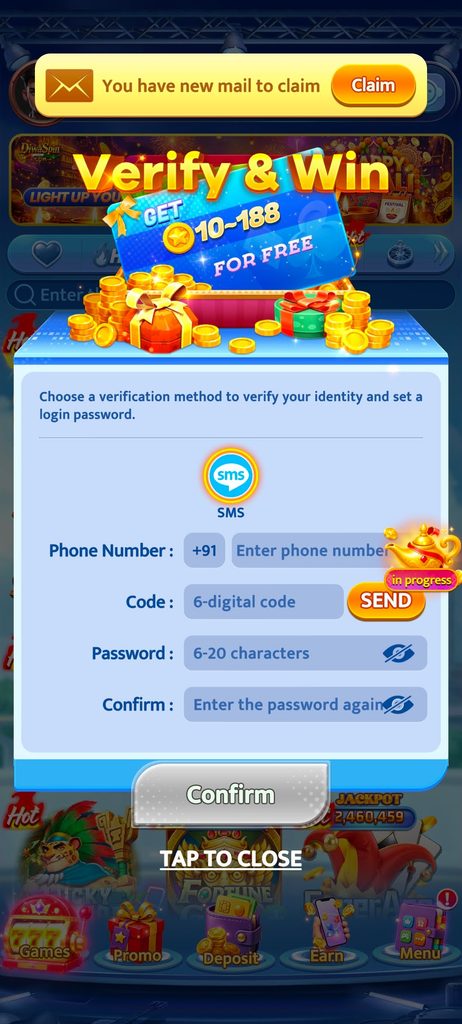
How To Register Phone Number In DiwaSpin App?
Registering a phone number in the DiwaSpin app is an important step for users who want to create an account and access the platform’s features. If you are a new user and do not know how to register your mobile number, this guide will help you understand the general registration process.
In this article, we will explain how to enter your phone number, verify an OTP, create an account, solve common registration problems, and keep your personal information safe.
Important: I cannot currently verify DiwaSpin’s official registration process. The steps below are general mobile-app registration instructions, not confirmed instructions for this particular app.
1. What Is Phone Number Registration in DiwaSpin?
Phone number registration is a process in which a user provides a mobile number to create or access an account.
Many mobile applications use phone number verification to:
- Identify registered users.
- Verify mobile number ownership.
- Help users recover their accounts.
- Send login verification codes.
- Provide account-related notifications.
Before registering, make sure that you are using the genuine DiwaSpin application.
2. Requirements for DiwaSpin Registration
Before starting the registration process, prepare the following things:
1. Smartphone
You need an Android or iOS smartphone that supports the application.
2. Active Mobile Number
Keep an active mobile number ready. You should have access to the SIM card because you may need to receive an OTP.
3. Internet Connection
A stable internet connection is necessary to open the application and submit registration details.
4. Official Application
Use only an app obtained from a verified official source.
5. OTP Access
If the application uses OTP verification, make sure your phone can receive SMS messages.
3. How to Register a Phone Number in DiwaSpin App
Follow these general steps to register your mobile number.
Step 1: Open the DiwaSpin App
First, open the DiwaSpin application on your smartphone.
- Unlock your mobile phone.
- Find the DiwaSpin app icon.
- Tap the icon.
- Wait for the application to load.
Make sure that you have downloaded the genuine application.
Step 2: Find the Registration Option
After opening the app, look for the registration or account creation option.
Depending on the app interface, you may see options such as:
- Register
- Sign Up
- Create Account
- Login
- Mobile Number Login
If you are a new user, look for the registration option rather than trying to log in with an existing account.
Step 3: Select Your Country Code
If the registration page asks for a country code, select the correct country.
For example, users registering an Indian mobile number generally select:
- Country: India
- Country code: +91
Make sure the country code matches your mobile number.
Step 4: Enter Your Mobile Number
Now enter your active mobile number in the phone number field.
Follow these instructions:
- Tap the mobile number box.
- Enter your phone number.
- Check every digit carefully.
- Make sure the number is correct.
- Continue to the next step if the application provides a verification option.
Do not enter someone else’s mobile number without their permission.
Step 5: Request an OTP
If the application supports SMS verification, you may see a button such as:
- Send OTP
- Get Code
- Verify Number
- Continue
Tap the appropriate button.
An OTP may be sent to your registered mobile number.
Step 6: Enter the OTP
- Open your SMS inbox.
- Find the verification message.
- Read the code.
- Return to the registration page.
- Enter the OTP in the correct field.
Never share your OTP with another person, even if they claim to be customer support.
Step 7: Verify Your Mobile Number
After entering the OTP, follow the application’s verification instructions.
If the code is correct and the service accepts it, your mobile number may be verified.
If verification fails, check that:
- You entered the correct OTP.
- The code has not expired.
- You requested the code for the correct number.
- Your internet connection is working.
Step 8: Complete Your Account Registration
Some applications may request additional information after mobile verification.
This could include:
- Username
- Password
- Confirm password
- Referral code, if applicable
Only provide information that is necessary and clearly explained by the verified application.
Step 9: Submit Your Registration
Review your details before submitting the form.
Check your mobile number and other information carefully.
If everything is correct, follow the final registration instructions displayed by the application.
Step 10: Check Your Account
If the application confirms successful registration, you may be able to access your account using the registered phone number.
Keep your login information private.
4. How to Fix DiwaSpin OTP Not Received Problems
Sometimes users do not receive OTP messages. This can happen for several reasons.
Here are some general troubleshooting suggestions.
| Problem | Possible solution |
|---|---|
| OTP not received | Check mobile network coverage |
| Wrong mobile number | Recheck the entered digits |
| SMS delayed | Wait briefly before requesting another code |
| OTP expired | Request a fresh code |
| SMS inbox full | Clear unnecessary messages |
| Network problem | Restart your phone |
| App error | Check for an official app update |
Avoid repeatedly requesting OTPs within a short period because some services temporarily restrict requests.
5. How to Register With an Indian Mobile Number
If you are using an Indian mobile number, check the following details:
- Select India as your country.
- Use the +91 country code if requested.
- Enter your active mobile number.
- Check that the number is correct.
- Receive the OTP on your own SIM card.
- Enter the verification code if requested.
Remember that the exact registration fields may differ depending on the application’s official version.
6. Can You Register Without an OTP?
Some applications use SMS OTP verification, while others may use different account verification methods.
If DiwaSpin requires an OTP, you should follow its official verification process.
Do not use:
- Temporary SMS websites.
- Unknown OTP receiving services.
- Another person’s number without permission.
- Unofficial verification links.
These methods may put your account and personal information at risk.
7. Common DiwaSpin Registration Errors
Invalid Phone Number
This error may appear if the number is entered incorrectly.
Solution: Check the country code and mobile number.
Number Already Registered
This may mean that the mobile number is already associated with an account.
Solution: Try the official login or account recovery option rather than creating another account.
OTP Verification Failed
This can happen when the OTP is incorrect or expired.
Solution: Request a new OTP through the official application.
Registration Page Not Opening
This could be caused by an internet connection issue or a temporary service problem.
Solution: Check your connection and try again later.
Account Registration Unsuccessful
If registration fails, check the displayed error message and contact verified customer support if available.
8. Important Safety Tips for DiwaSpin Users
Before registering your phone number, remember these security tips.
- Use only an official application.
- Never share your OTP.
- Never share your banking PIN.
- Avoid suspicious registration websites.
- Do not provide unnecessary personal information.
- Check the privacy policy.
- Avoid unknown APK downloads.
- Do not pay an unknown person to activate your account.
- Use a strong and unique password if required.
- Contact only verified customer support.
If the platform involves deposits, payments, or real-money gaming, check its legality, terms, and financial risks before proceeding.
9. Frequently Asked Questions (FAQs)
Q1. How do I register my phone number in DiwaSpin?
Open the verified application, select Register, enter your mobile number, and follow the official verification instructions.
Q2. Is an OTP required for DiwaSpin registration?
It depends on the application’s registration system. If SMS verification is required, you will need access to your mobile number.
Q3. Can I register using an Indian phone number?
If the platform supports Indian users, select India (+91) and enter your active mobile number.
Q4. Why am I not receiving an OTP?
Possible reasons include poor network coverage, an incorrect number, delayed SMS delivery, or temporary service problems.
Q5. Can I use one phone number for multiple accounts?
This depends on the platform’s account policy. Check its official terms before attempting to create multiple accounts.
Q6. What should I do if my phone number is already registered?
Use the official login or account recovery process.
Q7. Is phone number registration free?
Check the official registration page and terms for any applicable charges. Do not pay unofficial agents.
Q8. Can I change my registered mobile number later?
That depends on whether the application supports changing registered phone numbers.
Q9. Is it safe to share my OTP with DiwaSpin support?
No. Never disclose your OTP to another person, including someone claiming to represent customer support.
Q10. What should I do if registration fails?
Check the error message, verify your details, and contact the platform through a verified support channel.
10. Conclusion
Registering a phone number is a common step in mobile application account creation. Generally, users need to open the application, select the registration option, enter their mobile number, complete verification if required, and follow the remaining instructions.
However, the exact DiwaSpin registration process has not been independently verified. Always check the official application and protect your personal information.