
Diwa Spin APK: 30% Referral Bonus – Play on the Diwa Spin App | Withdraw a ₹ 109 Bonus
Latest
59.3 MB
1.0.3
IOS & Android
650K+

Description
Diwa Spin APK is an Android application associated with spin-based games and online entertainment. It is designed for users who want to explore interactive gaming options through a mobile device. The app may offer a simple interface , different game modes, and account registration features, depending on the version available.
Before downloading Diwa Spin APK, users should check the app’s source, compatibility, privacy policy, and terms of service. If the application involves deposits, cash rewards, or withdrawals, it is important to understand the financial risks and applicable local laws.
Users should download applications only from trustworthy sources and avoid sharing passwords, OTPs, or banking details with unknown websites. Always verify the latest app information before installing it on your Android device.
How to Download Diwa Spin APK on Android
Downloading Diwa Spin APK may allow Android users to access the app’s available gaming features. Before installation, users should verify the website and ensure that the APK file is genuine and safe.


Steps to Download Diwa Spin APK
Step 1: Search for the App
Open your mobile browser and search for Diwa Spin APK. Look for a trustworthy source and verify the website’s identity before proceeding.
Step 2: Check the App Details
Review the app name, developer information, version, Android compatibility, permissions, and privacy policy. Do not trust a website simply because it claims to offer an official download.
Step 3: Download the APK File
If you find a verified download source, tap its download option and wait for the APK file to finish downloading. Avoid suspicious pop-ups, shortened links, and files that request unnecessary permissions.
Step 4: Locate the Downloaded File
Open your phone’s Downloads folder or file manager and locate the downloaded APK file. Check that the file comes from the source you intended to use.
Step 5: Install the Application
If Android asks for permission to install an app from an unknown source, proceed only if you have independently verified the file and trust its source. Otherwise, cancel the installation. Open the APK file and follow the on-screen instructions.
Step 6: Open the App
After installation, open Diwa Spin and review its terms, privacy policy, and requested permissions before creating an account or entering personal information.
Important Safety Tips
- Prefer Google Play or another verified distribution source whenever available.
- Do not install modified APKs or files from unknown websites.
- Never share your OTP, password, or banking PIN.
- Do not assume that bonuses or advertised earnings are guaranteed.
- Check whether the app’s activities are legal in your location before participating.
Conclusion
Downloading Diwa Spin APK requires careful attention to the download source, app permissions, and installation process. Follow the steps above only after verifying the file’s authenticity. If you cannot confirm that the APK is genuine, do not install it.
How to Sign Up for Diwa Spin APK?
Creating an account on Diwa Spin APK may allow users to access the application’s available features and games. The registration process can vary depending on the app version and website.
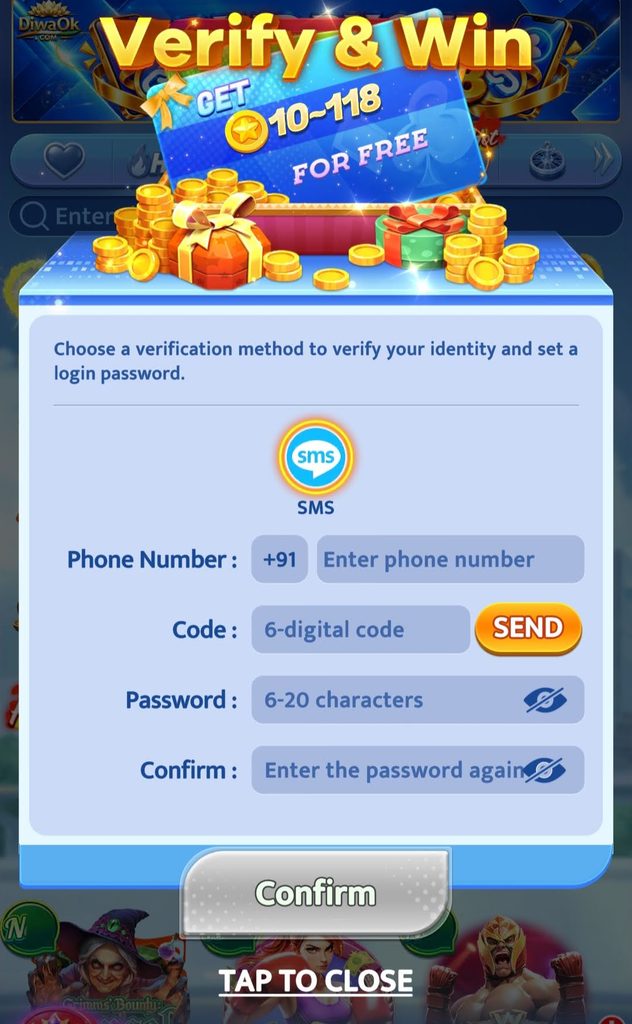
Step 1: Open the Application
Install the app only after verifying that the download source is trustworthy. Open Diwa Spin on your Android device.
Step 2: Click on Sign Up
Look for the Sign Up, Register, or Create Account option on the app’s home screen.
Step 3: Enter Your Details
Fill in the required information, such as your mobile number or other requested details, if the registration form asks for them.
Step 4: Create a Password
Choose a strong, unique password to protect your account. Avoid using your banking password or other sensitive credentials.
Step 5: Verify Your Account
If the application requires OTP verification, enter the code received on your registered phone number. Never share your OTP with another person.
Step 6: Complete Registration
Review the terms and conditions and submit the registration form. If the details are accepted, follow the on-screen instructions to access your account.
Safety Tips for New Users
- Verify the app and its developer before registering.
- Never share your OTP, UPI PIN, or banking password.
- Check the privacy policy and account withdrawal rules before depositing money.
- Do not assume that signup bonuses or gaming rewards guarantee earnings.
Conclusion
Signing up for Diwa Spin APK generally involves opening the application, selecting the registration option, entering the required details, and completing verification if requested. The exact process may differ by version, so follow the instructions displayed in the verified application.
Important: I couldn’t independently confirm an official Diwa Spin registration process. Third-party websites describe the app, but their claims are not proof of authenticity.
How to Refer on Diwa Spin APK?
The referral feature in an app allows users to invite friends using a referral link or code, if the feature is available. The exact referral process and rewards for Diwa Spin APK may vary depending on the app version.

Step 1: Open the App
Open Diwa Spin APK on your Android device and log in to your account if required.
Step 2: Find the Referral Option
Look for an option such as Refer & Earn, Invite Friends, Referral, or Rewards on the home screen or in your account menu.
Step 3: Get Your Referral Link or Code
If a referral program is available, open it to find your personal referral link or referral code.
Step 4: Share the Link
Use the available sharing option to send your referral link to friends through messaging apps or other supported platforms.
Step 5: Ask Your Friend to Register
Your friend can open the link or enter your referral code during registration, if required. They should review the app’s terms before creating an account.
Step 6: Check Referral Status
Return to the referral section to see whether the invitation has been recorded and whether any stated conditions have been completed.
Important Things to Remember
- Referral rewards may have eligibility requirements.
- Do not create fake accounts or use misleading invitations.
- Never share your password, OTP, or banking PIN.
- Do not assume that referral rewards are guaranteed or immediately withdrawable.
Conclusion
To refer someone on Diwa Spin APK, check whether the app provides a referral feature, obtain your referral link or code, and share it with friends. Follow only the instructions shown in the verified application.
Note: I couldn’t independently verify Diwa Spin APK’s current referral system or reward conditions. If you share a screenshot of the app’s home screen or referral page, I can explain the exact steps shown there.