
DiwaSpin APK Download 2026 – Get ₹91 Bonus Offer, Free APK Download NOW DIWA SPIN & Fast Android Install
Latest
78 MB
1.0.6
IOS & Android
8.2M

Description
DiwaSpin APK is an Android application that users may explore for online gaming and entertainment. The app may offer different games, interactive features, and account-related options, depending on its current version and availability. Users who want to try Diwa Spin APK should learn about its features, registration process, login system, and applicable terms before getting started.

Before downloading the application, check whether it is available from an official and trustworthy source. If the APK is distributed outside the Google Play Store, review the requested permissions and avoid installing files from unknown websites. Users should also check the app’s privacy policy and understand any rules related to deposits, withdrawals, or rewards.
Diwa Spin APK may appeal to users looking for a mobile gaming experience. However, its features, security, and availability should be independently verified before use. Always protect your personal information, never share OTPs or passwords, and remember that gaming rewards or earnings are not guaranteed.
What Is DiwaSpin APK?
DiwaSpin APK is an Android application that users may explore for online gaming and entertainment. It may provide access to different games and account features, depending on the app’s current version and availability. Users may be able to register an account, log in, and explore the available options through the app interface.

DiwaSpin APK may also include wallet or payment-related features if supported by the platform. However, users should verify these features and understand the applicable rules before making any financial transactions. The availability of rewards, deposits, and withdrawals should not be assumed without reliable confirmation.
The application may be distributed as an APK file for Android devices. Before installing it, users should check the source, review app permissions, and read the privacy policy. Downloading APK files from unknown websites can expose devices and personal information to security risks.
Overall, DiwaSpin APK is presented as a mobile gaming platform, but its official status, security, and specific features should be independently verified before use. Users should always protect their personal details and remember that gaming does not guarantee income or rewards.
How to Download Diwa Spin APK?
Downloading DiwaSpin APK is a process that may allow Android users to access the Diwa Spin gaming platform on their mobile devices. Before downloading, make sure you find a trusted and official source for the application. Follow these steps to download and install the APK safely.


Step 1: Visit the Official Website
Open your mobile browser and visit the official Diwa Spin website, if available. Make sure the website is genuine before downloading any file.
Step 2: Find the Download Option
Look for the DiwaSpin APK download button on the website. Check the app details and version before proceeding.
Step 3: Download the APK File
Tap the download button and wait for the APK file to finish downloading on your Android device.
Step 4: Install the Application
Open the downloaded APK file. If Android asks for permission to install apps from that source, enable it only if you trust the source and have verified the file.
Step 5: Open DiwaSpin APK
After installation, open the application and follow the on-screen instructions to register or log in, if those features are available.
Important Safety Tips: Avoid downloading APK files from unknown websites. Review app permissions and privacy information before installation. Never share your OTP, password, or banking details with unverified sources.
Note: I cannot verify the availability of an official Diwa Spin APK download link, so confirm the source before installing the app.
How to Register on Diwa Spin APK?
Registering on Diwa Spin APK may allow new users to create an account and access the platform’s available features. Follow these general steps to understand the registration process.
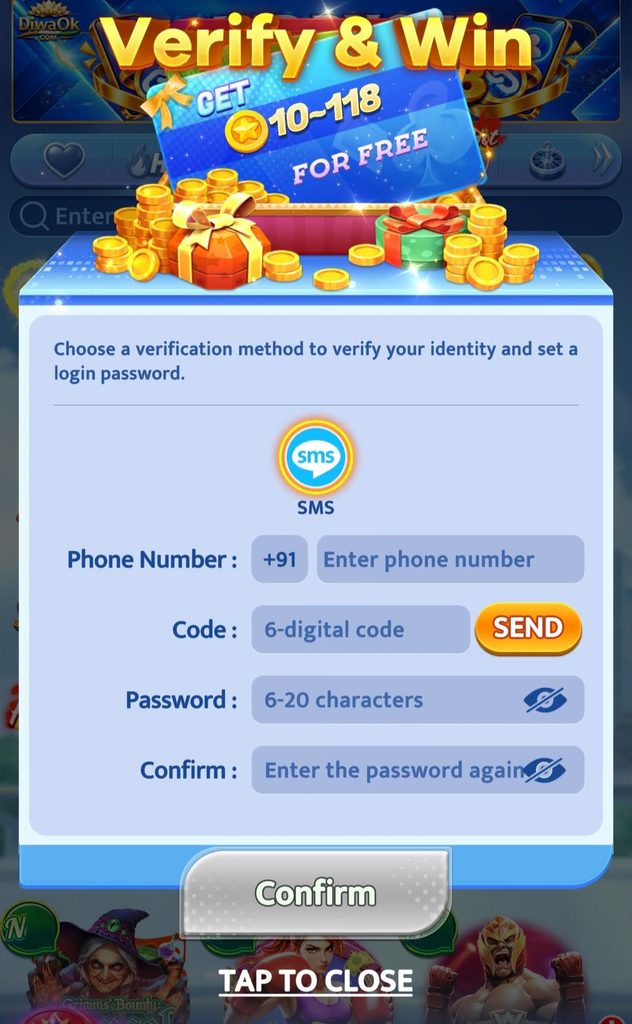
Step 1: Open the Diwa Spin App
First, download and open the DiwaSpin APK on your Android device. Make sure you use a trusted source.
Step 2: Click on Register
Look for the Register or Sign Up button on the app’s home screen and tap it to open the registration page.
Step 3: Enter Your Details
Fill in the required information, such as your mobile number or other details requested by the application.
Step 4: Create a Password
Create a strong and secure password for your account. Do not share your password with anyone.
Step 5: Enter the Verification Code
If the app sends an OTP to verify your mobile number, enter it only in the official app.
Step 6: Submit Your Registration
Review the information you entered and tap the Submit or Register button to complete the process, if these options are available.
Step 7: Log In to Your Account
After successful registration, return to the login page and enter your registered details to access your account.
Important: These are general registration instructions. The exact steps may differ depending on the current version of Diwa Spin APK. Never share OTPs or banking passwords, and carefully check any deposit requirements before using gaming or money-related features.
How to Add Money to Diwa Spin APK?
Adding money to DiwaSpin APK may allow users to access certain paid gaming features, depending on the app’s available services. Before making a payment, check the official app instructions and understand the applicable terms. Follow these general steps to learn how the process may work.
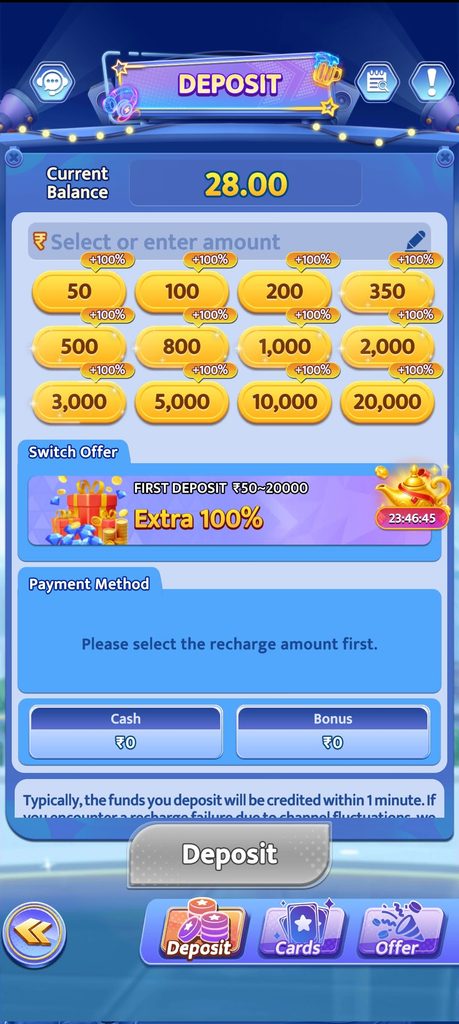
Step 1: Open the Diwa Spin App
Open the DiwaSpin APK on your mobile phone and log in using your registered account details.
Step 2: Find the Add Money Option
Look for an option such as Add Money, Wallet, or Deposit in your account dashboard, if available.
Step 3: Enter the Amount
If the app provides a deposit facility, enter the amount you want to add and check the minimum and maximum deposit limits.
Step 4: Select a Payment Method
Review the available payment methods, such as UPI or other supported options. Use only payment methods displayed through a verified, official payment process.
Step 5: Verify the Payment Details
Carefully check the recipient name, payment amount, and transaction information before confirming the payment.
Step 6: Check Your Wallet Balance
After completing a payment, check your transaction history and wallet balance. If the amount is deducted but not credited, contact official customer support and keep your transaction reference number.
Important Safety Tips: Do not transfer money to an unverified personal UPI ID or account. Never share your UPI PIN, OTP, or banking password. Do not pay extra fees to unknown people who promise guaranteed winnings or withdrawals.
Note: The exact DiwaSpin APK deposit process and payment options have not been verified. Only add money if the platform is legitimate, its terms are clear, and you understand the financial risks.
How to Refer and Earn Money in Diwa Spin APK?
The Refer and Earn feature in DiwaSpin APK, if available, may allow users to invite friends to join the platform through a referral link or referral code. Any reward depends on the app’s actual referral policy and eligibility conditions.

Step 1: Open DiwaSpin APK
Open the application on your mobile phone and log in to your registered account.
Step 2: Find the Refer and Earn Option
Look for an option such as Refer and Earn, Invite Friends, or Referral in the app menu.
Step 3: Get Your Referral Link or Code
If the feature is available, check your account for a unique referral link or code.
Step 4: Share with Friends
Share the referral link or code with friends through messaging apps or other permitted channels. Encourage them to review the platform before registering.
Step 5: Ask Your Friend to Register
Your friend can open the official platform and follow its registration instructions. If required, they can enter your referral code during registration.
Step 6: Check Referral Rewards
Open the referral section to check whether the invitation has been counted and whether any reward is available under the platform’s terms.
Important Tips: Read the referral rules carefully, and do not assume that every invitation will generate money. Never pay a fee just to unlock a promised referral reward, and avoid misleading earnings claims.
Note: The exact Refer and Earn feature and reward conditions for Diwa Spin APK have not been independently verified.
How to Add a Bank Account in Diwa Spin APK?
Adding a bank account to DiwaSpin APK may be necessary if the platform supports bank transfers or withdrawals. The exact process depends on the app’s available features. Follow these general steps to understand how bank account linking may work.
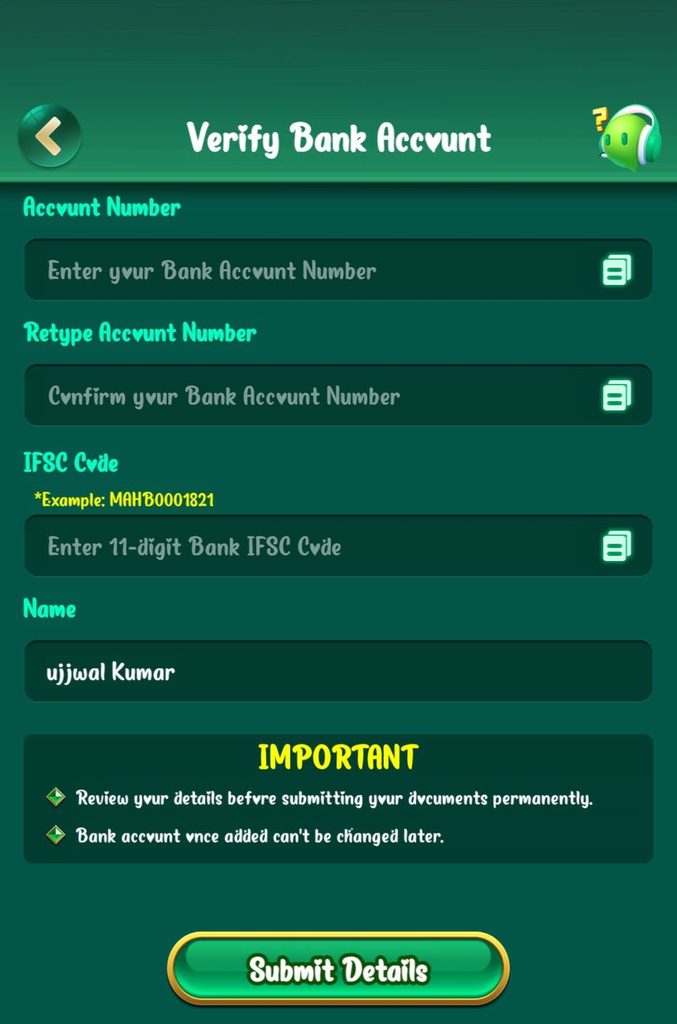
Step 1: Open Diwa Spin APK
Open the DiwaSpin app on your mobile phone and log in using your registered account details.
Step 2: Go to the Profile Section
Navigate to your profile, account settings, or wallet section and look for an option such as Bank Account, Add Bank, or Payment Settings, if available.
Step 3: Select Add Bank Account
Tap the Add Bank Account option to open the bank details form.
Step 4: Enter Your Bank Details
If the app provides a verified bank-linking form, enter the requested details carefully. These may include your account holder name, bank account number, and IFSC code.
Step 5: Check Your Information
Review all the details to ensure they are correct and that the account belongs to you.
Step 6: Complete Verification
Follow the official verification instructions, if required. Never share your ATM PIN, UPI PIN, banking password, or OTP with another person.
Step 7: Check the Account Status
Return to the bank account section and check whether your account has been added successfully.
Important Safety Tips: Only enter bank details on a platform you have independently verified as legitimate. Do not pay an unknown person to link your bank account or unlock withdrawals.
Note: The bank account linking feature and exact procedure for DiwaSpin APK have not been independently verified. These are general instructions, not confirmed app-specific steps.
How to Withdraw Money from DiwaSpin APK?
Withdrawing money from DiwaSpin APK may allow users to transfer an eligible wallet balance to their bank account, if the platform supports withdrawals. Before requesting a withdrawal, check the app’s official rules, minimum withdrawal amount, processing time, and any applicable fees.
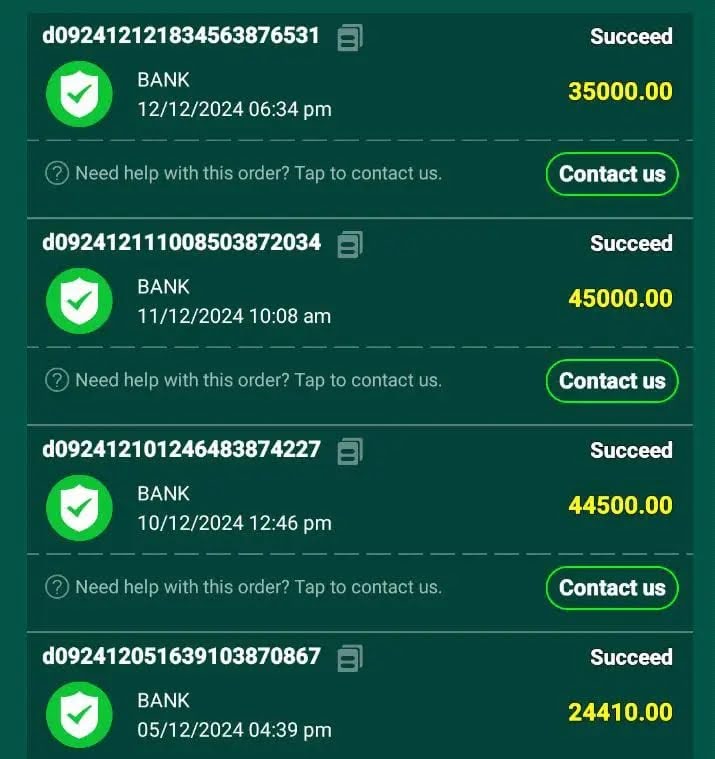
Step 1: Open DiwaSpin APK
Open the app on your mobile phone and log in using your registered account details.
Step 2: Go to the Wallet Section
Look for the Wallet, Balance, or My Account section and check whether a withdrawal option is available.
Step 3: Click on Withdraw
Tap the Withdraw button, if available, to open the withdrawal page.
Step 4: Add Your Bank Account
If required, link your own bank account through the app’s verified account settings. Carefully check your account holder name and bank details.
Step 5: Enter the Withdrawal Amount
Enter the amount you want to withdraw, making sure it meets the platform’s stated limits and eligibility requirements.
Step 6: Confirm Your Request
Review the amount and bank details before submitting the request. Use only the official payment process.
Step 7: Check Withdrawal Status
Visit your transaction history to check whether the request is pending, processing, completed, or rejected. If a payment is delayed, contact verified customer support.
Important Safety Tips
- Never share your OTP, UPI PIN, ATM PIN, or banking password.
- Do not pay an unknown person an extra fee to release your withdrawal.
- Keep your transaction ID and payment records.
- Remember that withdrawals and rewards are not guaranteed.
Note: The exact withdrawal process, payment methods, and processing times for Diwa Spin APK have not been independently verified. These are general instructions only.
How to Play Games in DiwaSpin APK?
DiwaSpin APK is presented as a mobile gaming platform where users may be able to explore different games and entertainment features. The available games and playing rules depend on the app’s current version. If you want to learn how to play games in Diwa Spin APK, follow these general steps.

Step 1: Open DiwaSpin APK
First, open the application on your Android mobile phone. Make sure you have downloaded it from a trustworthy source.
Step 2: Log In to Your Account
If the platform requires an account, enter your registered login details to access the available features.
Step 3: Explore the Games Section
Look for the Games section on the home screen. Browse the available games and select one you want to explore.
Step 4: Understand the Game Rules
Before starting, read the instructions and learn how the game works, including any entry requirements or scoring rules.
Step 5: Start Playing
Tap the Play or Start button, if available, and follow the on-screen instructions to play the selected game.
Step 6: Check Your Results
After completing a game, review your score or result. Any rewards depend on the game’s rules and the platform’s terms.
Step 7: Play Responsibly
Set a time limit and avoid spending money you cannot afford to lose. If a game involves deposits or real-money betting, understand the financial risks and check the applicable laws before participating.
Important Note: The exact games and gameplay features of DiwaSpin APK have not been independently verified. These are general instructions, and the actual interface may differ.
How to Join the Diwa Spin Telegram Group?
Joining a DiwaSpin Telegram group may help users find updates, announcements, and information about the platform, if an official group is available.


Step 1: Open the Telegram app on your mobile phone.
Step 2: Search for the official DiwaSpin Telegram group or channel, if one is available.
Step 3: Verify the group’s authenticity before joining. Check whether its link is shared through a trusted official source.
Step 4: Open the group or channel and tap the Join button.
Step 5: Read the group rules and follow the community guidelines to stay updated.
Safety Tip: Never share your OTP, password, bank details, or UPI PIN in a Telegram group. Avoid suspicious links and people promising guaranteed earnings.
Note: I cannot verify an official Diwa Spin Telegram group or invitation link. Join only a group whose authenticity you can confirm.